With the rapid growth of e‑commerce and social media marketing, more operators are building Facebook account matrices. However, many people encounter common issues when starting multi‑account operations:
Accounts get banned frequently, accounts become linked, newly registered accounts get restricted…
When the number of accounts increases from 1 to 5, 10, or even dozens, Facebook’s risk control system begins detecting account linkage. Once abnormal behavior is detected, light penalties include feature restrictions, while severe cases may lead to mass bans. Based on Facebook’s risk control mechanisms, this article focuses on three key steps to explore safe Facebook multi‑account solutions.
I. Why Are Facebook Multi‑Accounts Easily Banned?
Many people assume that simply registering multiple accounts is enough to run an account matrix. In reality, Facebook identifies account associations through multiple hardware and software signals.
Facebook mainly detects the following dimensions:
Device and browser fingerprint: determines whether your login environment is secure and trustworthy
Login IP address: determines where you are logging in from and whether it appears authentic
Cookie cache: determines which accounts your browser is associated with
Behavior patterns: determines what actions you perform and whether they appear normal
If multiple accounts use the same computer, browser, and IP, Facebook can still identify them as belonging to the same user even if you switch accounts. This may trigger risk control measures.
This is why clearing browser cache, using Chrome incognito mode, or switching accounts often still leads to bans. These methods appear useful but do not change browser fingerprints or device information, so Facebook can still detect associations.
Therefore, safe multi‑account management requires solving the core issue — environment isolation.

II. How to Avoid Facebook Detection and Safely Run Multiple Accounts
The previous section explained Facebook’s risk control mechanisms. Next, we explore three key aspects of safe multi‑account operations.
1.Create an Independent Environment for Each Account
Traditional multi‑account methods such as switching accounts in a regular browser carry high risks. Incognito mode cannot prevent account linkage, and purchasing multiple devices or internet connections is costly, especially for small teams.
This is why more operators are turning to Anti‑detect browsers. An Anti‑detect browser simulates multiple independent real devices on a single computer. Its core purpose is to help users safely and efficiently manage multiple platform accounts while avoiding bans caused by environment association.
An Anti‑detect browser can create:
Independent browser fingerprints
Independent cookies
Independent cache
Independent device information
Independent system environments
With isolated browser environments, Facebook perceives each account as logging in from a different device, significantly reducing association risks. Common Anti‑detect browsers include AdsPower, GoLogin, and Multilogin, which provide browser fingerprint isolation solutions.
However, environment isolation alone is not enough. The second key factor is IP isolation.
2.Independent Environment with IP Isolation
Browser fingerprint isolation and independent proxy IPs must work together to achieve full isolation. Many users still get banned after using Anti‑detect browsers because multiple accounts share the same IP. Even with different environments, identical IPs can still trigger account linkage.
Facebook strictly monitors IP quality, and the following scenarios often trigger risk control:
Frequent IP country switching
Using data center IPs
Using shared proxy IPs
Frequent IP changes within short periods
IP history with violations
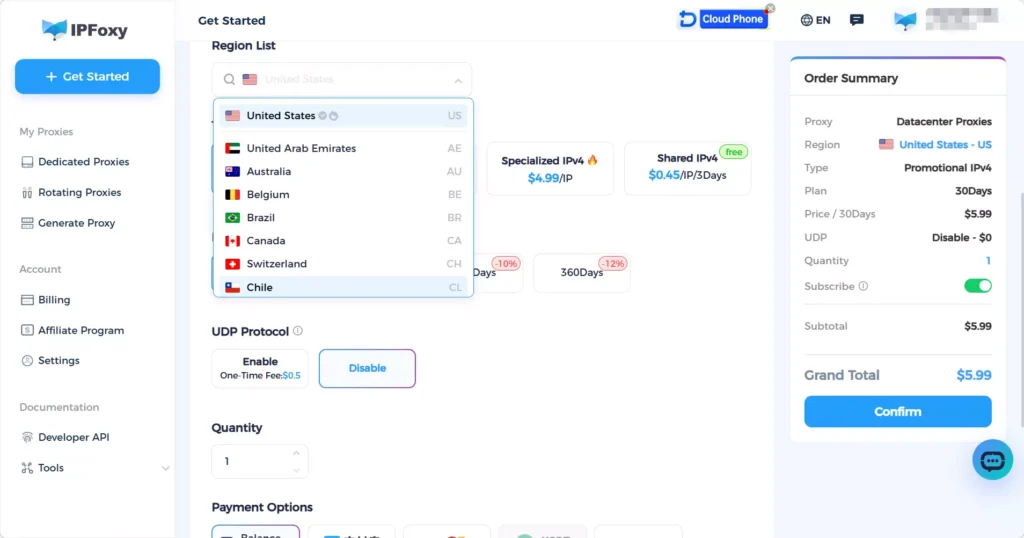
For advertising and account warm‑up, it is recommended to prioritize dedicated static residential proxy options. This better matches real user behavior. Many account matrix teams use dedicated residential proxies from providers like IPFoxy and integrate them into Anti‑detect browsers to simulate one device per account with one IP, reducing ban risks and improving account reliability and survival rate.
3.Maintain Good Operational Habits
Even with proper environment and proxy setup, improper operations may still lead to bans. Follow these best practices:
Keep environment parameters consistent
Set browser language to match the IP region
Match timezone and region with IP location
Use fixed environment with fixed IP
One account per browser environment
One browser environment per fixed proxy
New Accounts Must Be Warmed Up
Do not immediately add friends, run ads, or post frequently with new Facebook accounts. Instead, simulate real user behavior. During the first 3–5 days:
Browse feed content
Like and interact with posts
Follow a small number of pages
These actions significantly reduce the risk of new account bans.

III. FAQ
Facebook multi‑account management is suitable for:E‑commerce sellers、Facebook advertisers、Affiliate marketers、Social media matrix operators、Facebook Marketplace sellers
These users typically require multiple accounts for promotion and therefore need safe multi‑account solutions.
Recommended proxy types:Residential proxy (recommended)、Dedicated static proxy (more stable)、Exclusive proxy (avoids association)
Not recommended:Free proxies、Data center proxies、Shared proxies
These proxies are more likely to be flagged as abnormal traffic and may trigger restrictions or bans.
Without proper isolation, advertising accounts may become linked, resulting in:Ad account restrictions、Business Manager bans、Stricter ad review
Using independent environments and independent proxies helps reduce linkage risks and improve advertising stability.
IV. Conclusion
As account matrix operations become more common, Facebook multi‑account management has become a fundamental capability for marketing teams. Building a secure environment in advance helps reduce account risks and ensures long‑term stable operations.
It is recommended to create independent browser environments, use residential proxies or dedicated static proxies, maintain good operational habits, and properly warm up accounts. Following these practices can significantly improve the stability and safety of Facebook multi‑account operations.