In 2026, browser automation tools have become the mainstream solution for web scraping and automation tasks. Among them, Playwright and Puppeteer are the two most widely discussed frameworks. Many developers face the same question: what are the differences, and how should you choose in real projects?
This article provides a structured comparison of Playwright and Puppeteer from features, developer experience, and real-world scraping scenarios, helping you make better technical decisions based on your needs.
I. What Is Playwright
Playwright is an open-source browser automation framework developed by Microsoft. It is widely used for web automation testing and data scraping. It allows developers to control browsers programmatically to simulate real user actions such as navigation, clicking, form filling, and data extraction.
Core features:
- Multi-browser support: supports Chromium, Firefox, and WebKit
- Built-in auto-waiting: executes actions after elements are ready
- Closer to real user behavior: execution flow mimics real interactions
- Multi-language support: supports JavaScript, Python, Java, and .NET
II. What Is Puppeteer
Puppeteer is a browser automation tool developed by Google. Built on Node.js, it provides a simple API that allows developers to easily automate browser actions and perform data scraping tasks.
Core features:
- Focus on Chromium: optimized for Chrome-based automation
- Simple API: beginner-friendly and easy to use
- Strong page control: precise control over browser behavior
- Mature ecosystem: large community and extensive resources

III. Playwright vs Puppeteer: In-Depth Comparison
This section compares Playwright and Puppeteer across multiple dimensions to highlight their practical differences.
1. Language support
- Puppeteer mainly supports JavaScript and TypeScript
- Playwright supports JavaScript, Python, Java, and .NET
2. Browser support
- Puppeteer: focused on Chromium, limited Firefox support
- Playwright: supports Chromium, Firefox, and WebKit
3. Scraping development experience
Puppeteer: simple structure but requires manual control
const puppeteer = require('puppeteer');

async function run() {
  const browser = await puppeteer.launch({ headless: "new" });
  const page = await browser.newPage();

  await page.goto('https://example.com');

  await page.waitForSelector('.title');

  const text = await page.$eval('.title', el => el.innerText);
  console.log(`Title: ${text}`);

  await browser.close();
}
run();
Puppeteer requires explicit waiting logic such as waitForSelector. This manual approach offers flexibility but increases code complexity when handling dynamic pages.
Playwright: smarter automation model
const { chromium } = require('playwright');

async function run() {
  const browser = await chromium.launch();
  const context = await browser.newContext();
  const page = await context.newPage();

  await page.goto('https://example.com');

  const text = await page.locator('.title').innerText();
  console.log(`Title: ${text}`);

  await browser.close();
}
run();
Playwright uses BrowserContext for isolation and supports concurrent tasks without restarting the browser. Its locator API includes built-in auto-waiting, reducing the need for manual wait logic and improving stability.
4. Performance and efficiency
- Puppeteer: stable for lightweight tasks but requires optimization for high concurrency
- Playwright: better performance in multi-page and high-concurrency scenarios
5. Auto-waiting mechanism
- Puppeteer: manual waiting, flexible but error-prone
- Playwright: built-in auto-waiting, improves reliability
6. Recommended use cases
| Use Case / Scenario | Recommended Tool | Reasons |
| Large-scale, Cross-language Data Scraping | Playwright | Cross-browser support, superior parallel performance, and native Python support. |
| Complex SPA Applications (React/Vue) | Playwright | Robust auto-waiting mechanism and native Shadow DOM penetration. |
| Lightweight, Single-Chrome Automation | Puppeteer | Pure Node.js ecosystem with a lower cognitive load/learning curve. |
| Legacy Project Maintenance / Jest Integration | Puppeteer | Highly mature community accumulation and extensive plugin support. |
IV. How to Improve Scraping and Automation Success Rate
In real-world scraping, the key challenge is not whether data can be extracted, but whether it can be done consistently and without being blocked. This is especially true for ecommerce, social media, and map-based platforms.
Many developers find that scripts work in small-scale testing but fail at scale due to anti-bot mechanisms.
1. Why scripts fail at scale
(1) Abnormal IP usage patterns
- High-frequency requests from a single IP
- Multiple accounts sharing one IP
- Frequent IP switching
Result: IP bans or CAPTCHA challenges
(2) Unrealistic request behavior
- Directly accessing target pages every time
- Missing navigation flow (home → list → detail)
- Not loading images or JavaScript
Result: flagged as non-human traffic
(3) Session and identity mismatch
- Cookie and IP inconsistency
- Frequent login state changes
- Same account accessed from multiple regions
Result: account risk control or verification
2. How to improve success rate
(1) Simulate real user behavior
- Follow natural browsing paths
- Control dwell time and interaction frequency
(2) Use proper IP rotation strategies
- Logged-in tasks: require stable IP
- Large-scale scraping: use rotating proxy
- Multi-account setups: avoid sharing IPs
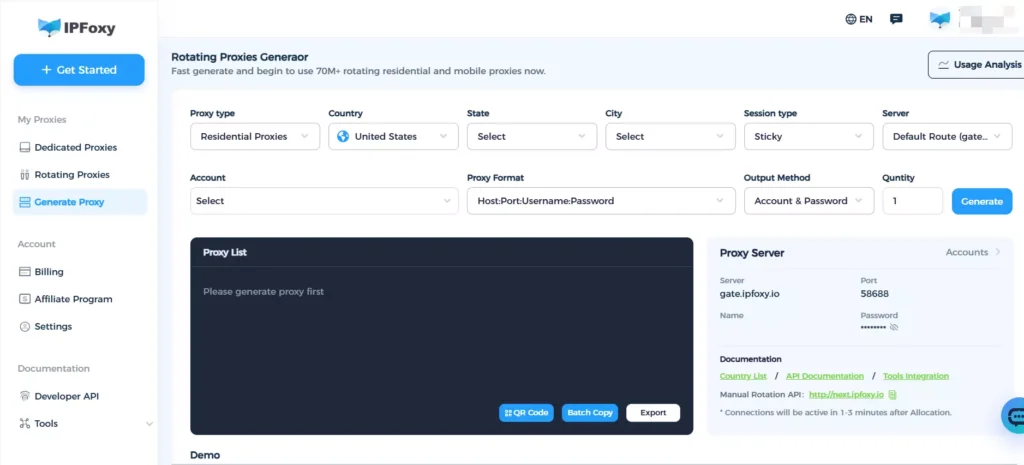
In real projects, many teams choose IPFoxy rotating residential proxy solutions. With over 90 million real residential IPs across 200+ regions, supporting request-based rotation and sticky sessions, it helps reduce detection risks and improves scraping stability.
(3) Reduce automation detection
- Add random delays (0.5s–3s)
- Randomize request headers (User-Agent, Accept-Language, etc.)
- Align TLS fingerprints with real browser versions
V. FAQ
Usually due to missing browser dependencies or lack of GPU acceleration. Playwright users should use official Docker images, while Puppeteer requires manual dependency installation.
Use Playwright BrowserContext for isolation within a single instance, and block static resources like images and fonts using page.route().
Disable WebRTC in the browser context and use clean residential proxy to ensure DNS consistency.
VI. Conclusion
There is no absolute winner between Playwright and Puppeteer. The right choice depends on your use case. Playwright is better suited for scalable, engineering-focused scraping, while Puppeteer remains efficient for lightweight automation tasks.
In real projects, tools are only the foundation. Long-term scraping stability depends on strategy design, including environment simulation, IP management, and request behavior control. Combining the right tools with proper strategies is key to achieving reliable data extraction.