If you often need to check competitor prices, track industry news, collect job postings, or prepare data for simple analysis, you’ve probably felt the pain of repetitive manual work:
Open webpage → copy information → paste into Excel → repeat dozens of times.
With OpenClaw, these repetitive actions can be turned into an automated workflow triggered by a single natural language command. Even beginners with no coding experience can use it as easily as turning on a light.
In this article, you’ll learn how to:
- Master basic web scraping in 3 minutes
- Build an automated competitor price monitoring system
- Choose the right scraping skills for different scenarios
- Configure a more stable scraping environment
- Apply 5 common real-world scraping use cases
After reading, you’ll be able to hand your scraping tasks over to OpenClaw and let data come to you automatically.

1. What Is OpenClaw and Why Is It Beginner-Friendly?
In one sentence: OpenClaw is a tool that lets you perform web scraping and automation tasks using natural language.
Traditional web scraping usually requires:
- Writing Python code
- Setting up and maintaining environments
- Dealing with anti-bot systems
- Implementing schedulers by yourself
OpenClaw only requires:
- Sending it a simple instruction
It will then automatically:
- Install the right skills
- Execute the scraping task
- Generate structured results
- Push them to your WeChat, Feishu, or other channels
This makes it extremely friendly for non-technical users.
2. Web Scraping: One of the Most Practical OpenClaw Skills
2.1 Two Main Types of Scraping Skills in OpenClaw
- curl-http
Best for simple pages and fast HTTP requests. - playwright-scraper-skill
Supports JavaScript rendering and is suitable for dynamic pages and ecommerce sites.
2.2 A Real-World Scenario
Example request:
“Scrape product names, prices, and sales for ‘laptops’ from an ecommerce platform and export them to Excel.”
OpenClaw will automatically:
- Open the target page
- Fetch the product list
- Extract the relevant fields
- Save them into a spreadsheet
- Return the file to you
You don’t need to write any code.
3. 3-Minute Tutorial: Scrape Product Prices
Step 1: Install Scraping Skills
In your terminal:
clawhub install playwright-scraper-skill
clawhub install curl-http
Or simply tell OpenClaw:
“Help me install web scraping skills.”
Step 2: Start Scraping with a Command
For example:
“Scrape product names, prices, and sales for ‘laptops’ from XX platform and save them to an Excel file.”
Step 3: Set Up a Scheduled Task
For example:
“Run this scraping task every day at 9:00 AM and send the Excel file to my Feishu.”
From then on, you never need to refresh the page or copy-paste manually.
4. Sample Scraping Configuration
OpenClaw’s configuration is intentionally simple. A basic example:
{
  "url": "https://example.com/products",
  "selector": ".product-item",
  "fields": ["title", "price", "sales"],
  "output": "excel"
}
You just need to tell OpenClaw:
- Where to scrape (
url) - What to scrape (
selectorandfields) - How to output the result (
output)
5. Advanced Usage: Let Data Come to You
Here are some practical use cases you can drive with a single natural language instruction:
- Multi-Platform Price Comparison
- “Scrape iPhone prices from JD, Taobao, and Pinduoduo and create a comparison table.”
- Price Monitoring
- “If this product’s price drops by more than 10%, send me a message on WeChat.”
- Scraping + Analysis
- “Scrape the latest 100 reviews and analyze the ratio of positive vs. negative feedback.”
- New Product Alerts
- “Notify me as soon as a new product is listed in this category.”
All of these tasks would traditionally require custom scripts. With OpenClaw, they can be automated through natural language.
6. When Scraping Across Regions, Use Proxies for Stability
Most scraping tasks can run from your local environment, but proxies are very helpful in cases like:
- Access to sites that are unstable from your region
- Viewing region-specific pages (e.g., localized ecommerce pages)
- Websites with strict limits on request frequency or IP addresses
- Platforms (ecommerce, job boards, etc.) with sensitive risk controls
In such scenarios, you need a flexible, switchable, and stable access environment.
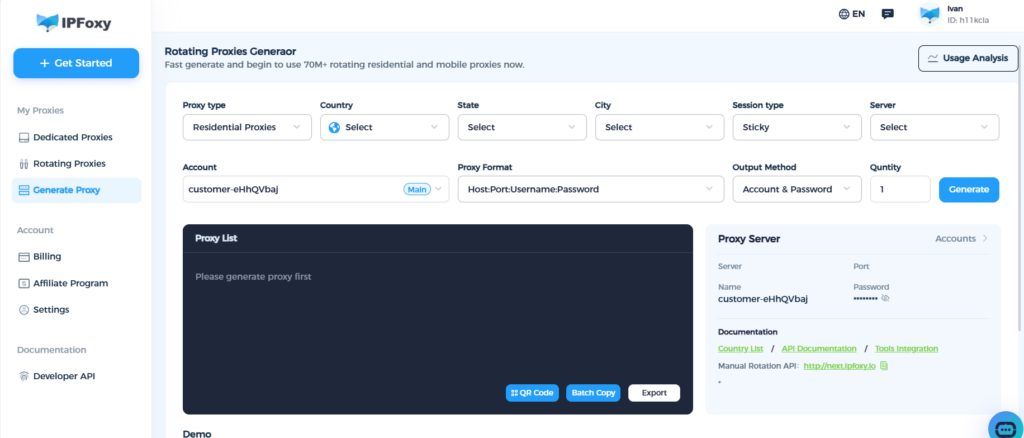
Below is a practical example usingIPFoxy rotating residential proxythat you can apply directly.
6.1 Choose a Gateway (Both Support Global IPs)
- APAC gateway:
gate-sg.ipfoxy.io - Americas gateway:
gate-us.ipfoxy.io - Port:
58688(SOCKS5 / HTTP)
6.2 Username Format (Specify Country / State / City)
Example username:
customer-UserName-cc-US-st-Florida-city-Miami-sessid-1691658980_100136.3 Full Example (SOCKS5)
socks5://gate-sg.ipfoxy.io:58688:customer-UserName-cc-US-st-Florida-city-Miami-sessid-1691658980_10013:YourPassword6.4 Refresh IP
Open:
http://next.ipfoxy.io6.5 Browser Configuration
Fill in the host, port, username, and password in your browser proxy settings.
The username must include country, city, and sessid information.
The goal of using a proxy is not to “hide”, but to:
- Make your scraping environment behave more like real users
- Avoid lag, timeouts, and unnecessary risk control
- Improve stability and success rate of your scraping tasks
7. Common Scraping Skills Overview
| Scenario | Recommended Skill | Suggested Frequency |
| Competitor price monitoring | playwright-scraper-skill | Once per day |
| Industry news collection | curl-http + RSS | Once per hour |
| Job posting monitoring | playwright-scraper-skill | Twice per day |
| Review scraping & analysis | ai-data-scraper | Real-time or timed |
Web scraping is no longer a “mysterious” technique. The key is choosing the right tools and workflows.
8. Recommended OpenClaw Skills
Scraping Skills
deep-scraperplaywright-scraper-skillweb-scraper-as-a-serviceai-data-scraperdata-scraper
Search Skills
tavily-search(recommended)ddg-web-searchbaidu-search
HTTP / API Skills
curl-httphttpapi-tester
9. Conclusion: Let OpenClaw Automate Your Daily Work
You’ve just learned:
- How to set up basic web scraping in 3 minutes
- How to automatically collect competitor prices, news, and job postings
- How to schedule tasks and push results automatically
- How to configure proxies for more stable, region-specific scraping
- Which skills are most suitable for beginners
With OpenClaw, you can automate repetitive work and focus your time on higher-value analysis and decision-making, while letting data come to you automatically.