In 2026, browser automation has evolved far beyond traditional QA testing and web scraping. With the rise of LLM-powered AI Agents, automation frameworks have become the foundation for autonomous web browsing, task execution, and large-scale AI workflows.
This guide compares Selenium, Puppeteer, and Playwright across architecture, performance, scalability, AI automation compatibility, and proxy integration.
I. Top Three Automation Frameworks
1. Selenium
Selenium was introduced in 2004 and remains the industry standard for browser automation. With Selenium 5.0, the framework has undergone a major architectural upgrade.
Key Features:
• Supports Chrome, Firefox, Edge, Safari, and other major browsers.
• Supports Java, Python, C#, JavaScript, and more.
• Large ecosystem and strong enterprise adoption.
Best For:
Automated testing, enterprise workflows, and projects requiring broad browser compatibility.
2. Playwright
Playwright was open-sourced by Microsoft in 2020 and has become the fastest-growing browser automation framework.
Key Features:
• Native support for Chromium, Firefox, and WebKit.
• Built-in Auto-Wait mechanism.
• Browser Context support for large-scale concurrency.
Best For:
Web scraping, AI Agent automation, eCommerce data collection, social media automation, and large-scale browser operations.
3. Puppeteer
Released by the Chrome team in 2017, Puppeteer popularized the Chrome DevTools Protocol (CDP).
Key Features:
• Simple and intuitive API.
• Fast execution speed.
• Popular in web scraping and browser automation.
Best For:
Chrome/Chromium automation, web scraping, screenshots, and PDF generation.
Quick Comparison Table
| Dimension / Feature | Playwright | Puppeteer | Selenium 4+ |
| Maintainer | Microsoft | Selenium Foundation | |
| Underlying Protocol | Playwright Protocol (Bi-directional WebSocket, self-developed efficient protocol) | Chrome DevTools Protocol (CDP) + WebDriver BiDi (Firefox supported since v23+) | W3C WebDriver (5.0 fully transitions to WebDriver BiDi) |
| Performance & Latency | Excellent (Asynchronous event-driven, millisecond response, balanced across browsers) | Excellent (Direct connection to Chrome engine, no middleman, fastest in single scenarios) | Slower (Heavy legacy baggage, though 5.0 BiDi upgrade boosts speed by 40%-60%) |
| Browser Support | Chromium, Firefox, WebKit (Safari core) – all natively supported | Primarily Chromium (Firefox supported since v23+, but not the primary focus) | All major browsers (Chrome, Safari, Firefox, Edge, relying on vendor drivers) |
| Language Support | Python, Node.js, Java, .NET (Unified official API) | Officially Node.js only (TypeScript/JavaScript); unofficial community ports exist | Java, Python, C#, JavaScript, Ruby, Kotlin, etc. (Most extensive) |
| Auto-Wait Mechanism | ✅ Natively built-in (Performs automatic Actionability checks before execution, no explicit wait needed) | ⚠️ Partial support (Requires manual implementation of waitForSelector or page.waitForTimeout) | ❌ Manual implementation required (Explicit/implicit waits often lead to brittle code) |
| Multi-Environment Concurrency Isolation | ✅ BrowserContext (Lightweight contexts; opens dozens of fully isolated environments per second within a single process) | ⚠️ Supports multiple pages, but memory footprint is high, causing performance drops under high concurrency | ❌ Driver instance-level (Each independent environment requires launching a completely new browser process, heavy resource overhead) |
| Anti-Detection Capability | Strong (Built-in randomized fingerprints, customizable browser parameters to bypass common anti-bot measures) | Medium (Relies on third-party libraries like puppeteer-extra and stealth-plugin) | Weak (Traditional WebDriver fingerprints are obvious and easily detected) |
| Proxy Configuration | ✅ Native support (Configured via proxy parameters or contexts) | ✅ Native support (Configured via –proxy-server at launch or dynamically switched) | ✅ Supported (Configured via Proxy class or DesiredCapabilities) |
| AI Agent Compatibility | ⭐⭐⭐⭐⭐ Extremely High (Perfect fit for MCP protocol, directly exports accessibility trees, optimizes token usage by 3-4x) | ⭐⭐⭐ Medium (Requires integration with third-party SDK wrappers; recently introduced a token-efficient CLI) | ⭐⭐ Low (Heavy architecture, unsuited for high-frequency, adaptive agent calls) |
II. Real-World Performance Comparison
1. Startup Speed
In raw tests launching a headless browser, Puppeteer and Playwright achieve cold startup speeds of 100-300 milliseconds because they connect directly to the underlying binary protocols via WebSockets. Selenium, however, typically takes 1-2 seconds due to the need to initialize the corresponding Driver process and handle layered HTTP handshakes.
2. Concurrency
Selenium launches a new browser process for each isolated environment, resulting in significant memory usage.
Playwright uses BrowserContext, allowing dozens of fully isolated environments to run within a single browser process while reducing resource consumption by over 70%.
3. Stability
Modern React and Vue applications render content asynchronously. Selenium often requires manual waits, while Playwright automatically performs Actionability Checks before interacting with elements, improving reliability significantly.
4. Compatibility
If your enterprise requires testing specific rendering issues on Safari within a physical Mac environment, or if your development team relies strictly on Java/C#, Selenium’s multi-language support and deep-rooted history make it irreplaceable.
5. AI Agent Compatibility
In 2026, AI Agent + Browser Automation has become one of the hottest directions. Projects like Claude Code, OpenAI Agent, and OpenManus all prioritize Playwright by default for three key reasons:
- Native MCP Protocol Support: Playwright can output the page’s Accessibility Tree directly to the LLM, eliminating the need to parse raw DOM text.
- Highly Efficient Token Usage: Compared to traditional DOM serialization, Playwright’s optimized approach reduces token consumption for long sessions by 3 to 4 times.
- Execution Stability: Playwright’s auto-wait and auto-retry mechanisms drastically lower the failure rates of complex agent actions.
III. Proxy Integration and Anti-Detection Capabilities
For modern web scraping, accessing a page is only the beginning. Websites commonly evaluate:
• IP Reputation
• Request Frequency
• Browser Fingerprints
• Geographic Consistency
Residential Proxies provide a more authentic browsing environment than datacenter IPs and help reduce blocking risks.
IPFoxy offers residential proxies covering 200+ countries, static ISP proxies, mobile 4G/5G proxies, and supports both HTTP(S) and SOCKS5 protocols. It integrates seamlessly with Selenium, Puppeteer, and Playwright to significantly lower blocking risks for long-running scraper projects.
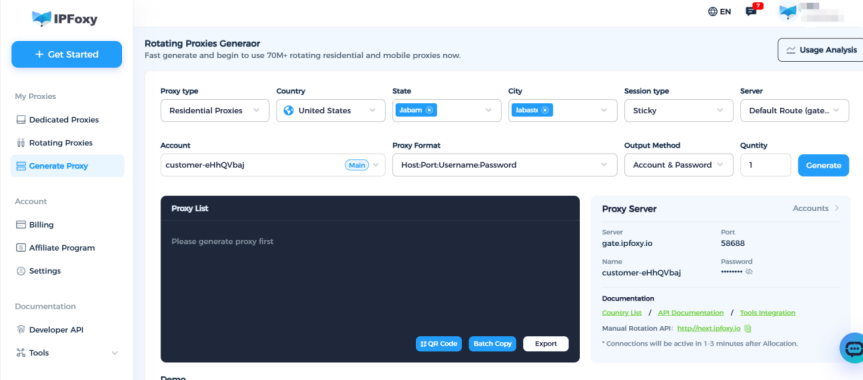
Here is how to configure an IPFoxy proxy across the three frameworks:
Selenium Proxy Configuration (Python)
from selenium import webdriver
from selenium.webdriver.chrome.options import Options

chrome_options = Options()

# Configure IPFoxy proxy address (with user/pass authentication)
# Static ISP or rotating residential proxies are recommended for the lowest fraud scores
proxy_server = "http://username:password@proxy.ipfoxy.com:port"

chrome_options.add_argument(f'--proxy-server={proxy_server}')

# Launch driver
driver = webdriver.Chrome(options=chrome_options)
driver.get("https://ipinfo.io")  # Verify the IP has switched to a clean residential IP from IPFoxy
print(driver.title)

driver.quit()
Puppeteer Proxy Configuration (JavaScript)
const puppeteer = require('puppeteer');

const proxy = 'http://user:pass@ipfoxy-proxy:port';

(async () => {
    const browser = await puppeteer.launch({
        args: [`--proxy-server=${proxy}`]
    });
    const page = await browser.newPage();
    await page.goto('https://example.com');
    // Your automation logic...
    await browser.close();
})();
Playwright Proxy Configuration (Python)
from playwright.sync_api import sync_playwright

with sync_playwright() as p:
    browser = p.chromium.launch(
        proxy={
            "server": "http://ipfoxy-proxy:port",
            "username": "user",
            "password": "pass"
        }
    )
    page = browser.new_page()
    page.goto("https://example.com")
    # Your automation logic...
    browser.close()
IV. Which Framework Should You Choose in 2026?
Your technical choice should align directly with your business pain points and engineering stack:
Choose Playwright if:
• You are building a new web scraping, data collection, or AI Agent project.
• You need high concurrency and efficient resource usage.
• You work primarily with Python or TypeScript.
Choose Puppeteer if:
• You are a Node.js-focused developer.
• Your project only targets Chrome/Chromium.
• You require direct access to advanced CDP capabilities.
Choose Selenium if:
• Your organization relies heavily on Java or C#.
• You already have large-scale Selenium Grid infrastructure.
• Cross-browser testing is a top priority.
V. Conclusion
Selenium, Puppeteer, and Playwright are all excellent browser automation frameworks, but they serve different needs.
For web scraping, AI Agents, multi-account automation, and large-scale data collection, Playwright is often the most future-proof choice. Combined with high-quality residential proxies, it can significantly improve scraping success rates and long-term stability.